

Have you ever wondered how caching could transform your React applications, making them faster? In this blog, We’ll explore how React Query utilizes caching to streamline data fetching and management, alongside various methods for effective caching. Additionally, we’ll uncover the power of optimistic updates, a key optimization technique rarely used.
What is cache?
In React Query, the cache is a temporary storage mechanism that holds the results of API requests. It acts like a middleman, between your React components and the server. Imagine it as a trusted friend who remembers things we need frequently, readily providing them when you ask.
Understanding React Query’s internal mechanisms is essential before using it, as it plays a crucial role in the state management of the application.
Let’s see a small example of how we can make an API call using react query(explained in depth below)

The response that we got upon making the API call is stored in data and cached with key as user.
How React Query Works: A Deep Dive
Before diving into how React Query functions, let’s get familiar with some key terms.
QueryClient — A vessel/container that holds the queryCacheand mutationCachecreated when the instance is created.
QueryCache — Central memory that stores all your fetched data and query details. It uses unique keys to find specific data and helps improve performance by caching results and managing data consistently across your app.
MutationCache — In React Query, mutations are actions that update data (like adding or removing items). This cache is used to temporarily store the results of these mutations until they are confirmed by the server (if applicable).
Query — A Query is the heart of data fetching. It holds the information you need (data, status, etc.), runs the function to get that data, and manages retries, cancellations, and updates when the data changes. It’s like a mini-manager for your data fetching process.
QueryObservers — An observer is created when we call useQuery which is subscribed to a query. That’s the reason we pass a queryKeyto useQuery.
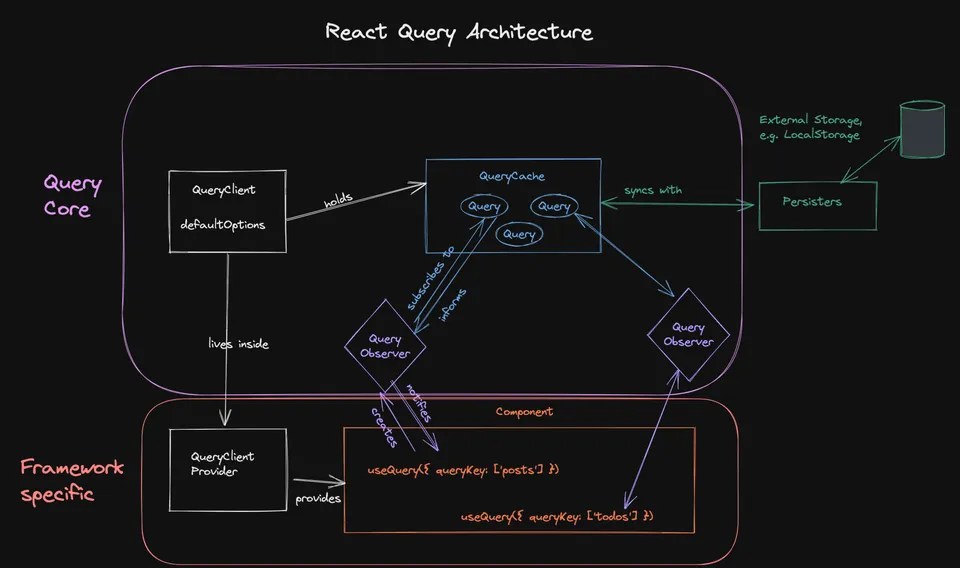
Let’s see the Internal working now –
When the component is mounted, an instance of QueryClient is created and passed to the entire application using context through QueryClientProvider (which uses React Context internally).
When we call useQuery with a query key, useQuery interacts with QueryClient. The QueryClient checks the QueryCache for the data identified by the queryKey. If the data exists and meets the freshness criteria (cache/stale time and no refetch is triggered):
- The cached data is directly returned to the component, and the component renders with the cached data.
- The
QueryObserver(created byuseQuery) notifies the component about the available data.
If the data is not in the cache or has missed the freshness criteria:
- A
Queryobject is created (if it doesn’t already exist), and theQueryObserveris established and linked to theQuery.
In both cases, the object contains an initial loading state while the data is being fetched. The queryFunction provided to useQuery is triggered asynchronously to fetch fresh data. Once the data is fetched, it is stored in the QueryCache along with the queryKey, and the QueryObserver is notified about the update. The component receives the updated data through the useQuery hook, triggering a re-render with the fresh data.
To perform asynchronous operations in React Query there are 2 ways –useQuery and useMutation. Let’s explore these hooks
UseQuery — a custom hook within React Query used to fetch data in a React component. This hook manages lots of things such as caching data after the initial fetch, re-fetching data in the background, etc.

let’s see the syntax and how to fetch data using the useQuery hook.
We need three parameters –
Query Key: A unique key that describes the data which is used to fetch, cache, and refetch the queries throughout the application.
Query function: This function contains the async operation that returns a promise that either resolves or throws an error.
Options: This is an object that contains a few properties like CacheTime, staleTime, refetchInterval, refetchOnWindowFocus, retry and many more. Please refer to this for more details.
The useQuery hook returns an object containing several properties:
- data: The API response.
- isLoading: A boolean flag indicating the current state of the API call.
- error: An object that appears if the query encountered an error while fetching.
- refetch: A function that can be called to manually trigger the API call.
And many more, please refer this for more details.
Notes
The query key should be unique to ensure proper caching and refetching. It is converted into an array internally, resembling a key-value pair.
- For example,
useQuery('Todo', fetchTodo)stores the result with the key'Todo'. useQuery(['Todo', 1], () => fetchTodo(1))stores the result with the key['Todo', 1].
These two caches are separate. If a falsy value is included in the dependency list, the query function will not be invoked.
Using the same queryKey for different queryFunctions will result in the most recent result being stored under that key, potentially causing issues.
UseMutation — It is a powerful hook for managing mutations (data modification operations). It simplifies the process of sending mutations to your backend API and handling the response accordingly.

The options and the object returned are almost similar except useMutation returns mutate instead of refetch and there won’t be any queryKey for useMutation because these are data modification operations.
mutate — It is a function used to initiate a mutation. It accepts an optional payload as an argument, representing the data to be sent to the mutation function.
For options and properties, please refer to this link
Let’s see an example of how to use useMutation and useQuery with an example.

Optimistic updates
Note — This will work only for Patch, delete and update(Since id’s are generally created in backend while creating any objects in most of the projects)
Let’s consider the above example. When a todo is deleted, there are 2 actions are happening currently —
1. A delete call with todoId.
2. A get call immediately to show that the updated list of todo items.
When the previous get api is called, The data is stored in the cache with the response.
All we need to do is to update the cache(Remove the todo item based on item from the cache).
React Query provides built-in mechanisms for updating cached data, offering a more streamlined approach compared to manual cache management using setQueryData. This method allows us to directly modify the data associated with a specific query key.
There are 2 cases for this –
Updating the cache onSuccess of delete api call
In this case, we are updating the cache once the delete api call is successful.

Updating the cache before making the api call
In this case, we are moving based on the assumption that the API call will be successful and updating the data using the onMutate function.
onMutate executes before the mutation happens. So we are deleting the todoItem here itself.
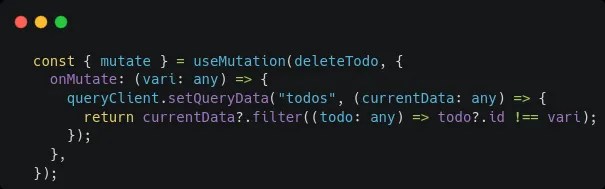
Note –
Immutable updates: Always update the cache data immutably. React Query expects a new data object instead of modifying the existing one directly.
Query key: Specify the correct queryKey to target the relevant cache entry.
In this blog, we’ve delved into the powerful capabilities of React Query, specifically focusing on how it utilizes caching to optimize data fetching and management in React applications. By understanding the internal mechanisms of React Query, such as QueryClient, QueryCache, MutationCache, and the use of QueryObservers, developers can efficiently handle API requests, improve application performance, and ensure data consistency across the application.
We’ve explored the useQuery and useMutation hooks, highlighting their roles in data fetching and mutation, respectively. Additionally, we’ve discussed the significance of optimistic updates, showcasing how they can enhance the user experience by providing instant feedback while awaiting server confirmation.
We hope you found this exploration of React Query insightful and practical. Stay tuned for more tips and techniques on optimizing your React applications. If you found this blog useful, please share it and subscribe for more content. Happy coding!
 Josh Software