

In the diverse world of JavaScript, whether working on frontend or backend projects, the map function is a commonly used function. I’ve been using it for years to transform arrays in a clean and efficient way, making it a key part of my JavaScript development. However, it wasn’t until recently that I realized I had only been scratching the surface of what the map function can truly do. By diving deeper into its capabilities, I discovered its “secret powers”, powerful features and techniques that enhance code readability, efficiency, and functionality. This exploration has not only improved my use of map but also revealed how it can be applied in more advanced scenarios, leading to more effective and elegant coding solutions. Let’s explore these in detail.
The array.map() function in JavaScript is a powerful method used to apply a transformation to each element of an array, resulting in a new array with the transformed values. It’s particularly useful for processing or displaying data in the array. Following is the basic syntax of it.

where,
element: The current item in the array.
index: The position of the current item (starting from 0).
array: The original array being processed.
Example of map() function in JavaScript
Let’s see how to double each number in an array using an arrow function.
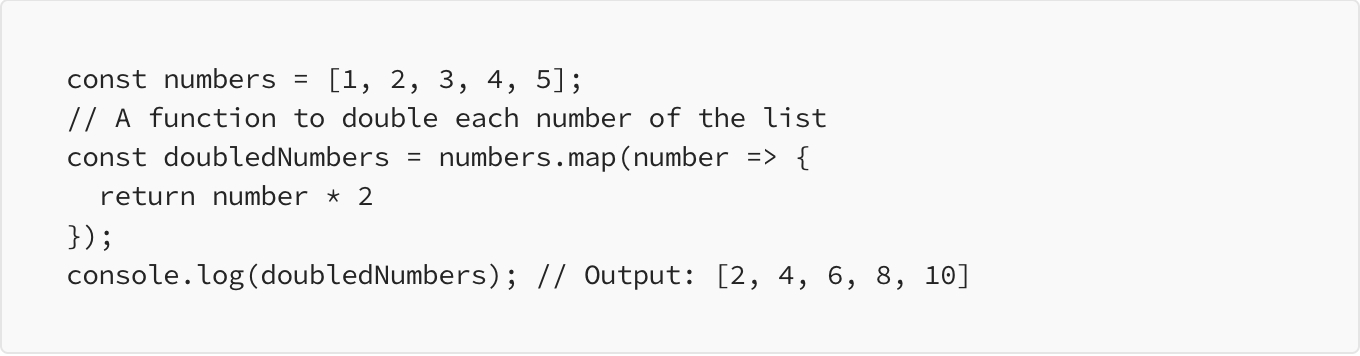
Explanation:
We start with an array of numbers.
Using map(), we create a new array, doubledNumbers, where each number is multiplied by 2 so the output is [2, 4, 6, 8, 10].
In this example, we only need to access numbers one by one and double them so we are not using index and array fields of the callback function. Where index can be useful when there is need to identify index of current element in the array.
So we are clear with first two parameters of the map’s callback function i.e. element and index, lets explore the third parameter i.e. array in detail.
array field in map() function’s callback
The third parameter, array, in the map() function’s callback provides access to the entire array being processed during each iteration. This can be helpful in certain situations where the context or scope requires dynamic access to the array within the map() callback. Lets explore different examples.
Here’s an example that uses the array parameter, even when the outer variable numbers is available:

Explanation:
We use the array parameter to calculate the total and average directly within the map() callback.
While we could use numbers directly, the array parameter ensures we’re working with the current array being processed, which is useful if the function is used generically or in a context where the original array variable might not be directly available or known.
When to Use the array Parameter
Generic Functions: If the map() function is part of a generic or reusable component that doesn’t know about the outer array variable, using the array parameter ensures it works correctly with the current array.
Dynamic Contexts: In dynamic or nested scenarios where the array might be altered or referenced differently, using the array parameter provides clarity and ensures accuracy.
Library or Utility Functions: When writing utility functions or libraries where the array is passed as an argument and not directly accessible by a fixed variable name, using the array parameter is safer.
When Not to Use the array Parameter
Simple Scripts: In straightforward scripts where the array is directly available and named consistently, using the array parameter may not be necessary.
Readability: If accessing the outer array variable directly improves readability and there’s no risk of context confusion, it can be simpler and clearer to use it.
Performance: While there’s minimal performance impact, avoiding unnecessary calculations inside map() by reusing pre-computed values (e.g., a known average) can be more efficient.
Is there a case where the original array is not accessible?
Yes, there are scenarios where the original array is not directly accessible, and the array parameter in the map() function becomes crucial. This often happens in modular or encapsulated code structures. Here’s an example:
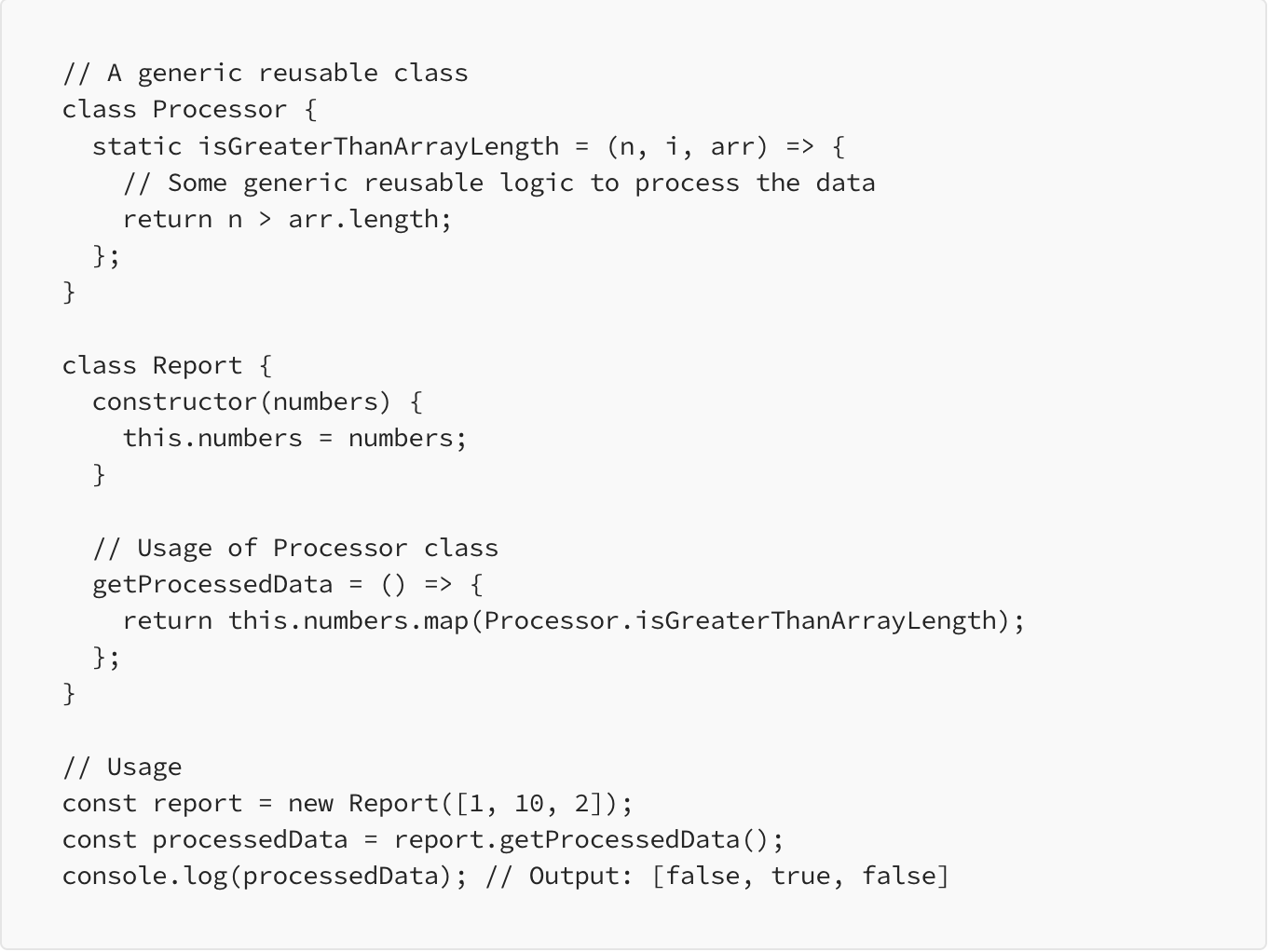
Explanation:
Encapsulation: In this example, the Processor class is designed to be a generic utility that processes data. It contains a static method isGreaterThanArrayLength, which operates on the array parameter to compare each element against the length of the array. This method does not have direct access to the numbers array from the Report class.
Array Parameter Usage: The array parameter (arr) is crucial in this context. It provides access to the length of the array so that the method can perform operations based on that length. Without the array parameter, the Processor class method would not be able to determine the length of the array it is processing.
Re-usability: By using the array parameter, the Processor class remains modular and reusable. It can be applied to any array passed to it via map(), regardless of the context or the specific array variable name used in the Report class.
This example illustrates how the array parameter in the map() callback function is necessary when the original array variable (this.numbers in the Report class) is not directly accessible due to encapsulation or modular design, enhancing re-usability and abstraction. It highlights the importance of using the array parameter to ensure that the function can operate correctly on the array’s data.
thisArg argument of map() function
In JavaScript, the map() function allows you to use a callback function and optionally set the context (thisArg) for that callback. Lets see how this is handled inside the callback function depending on whether it is a regular function or an arrow function.
In this section, we’ll use a Processor class with two methods: one as a regular function and the other as an arrow function. We will see how passing thisArg affects each method.
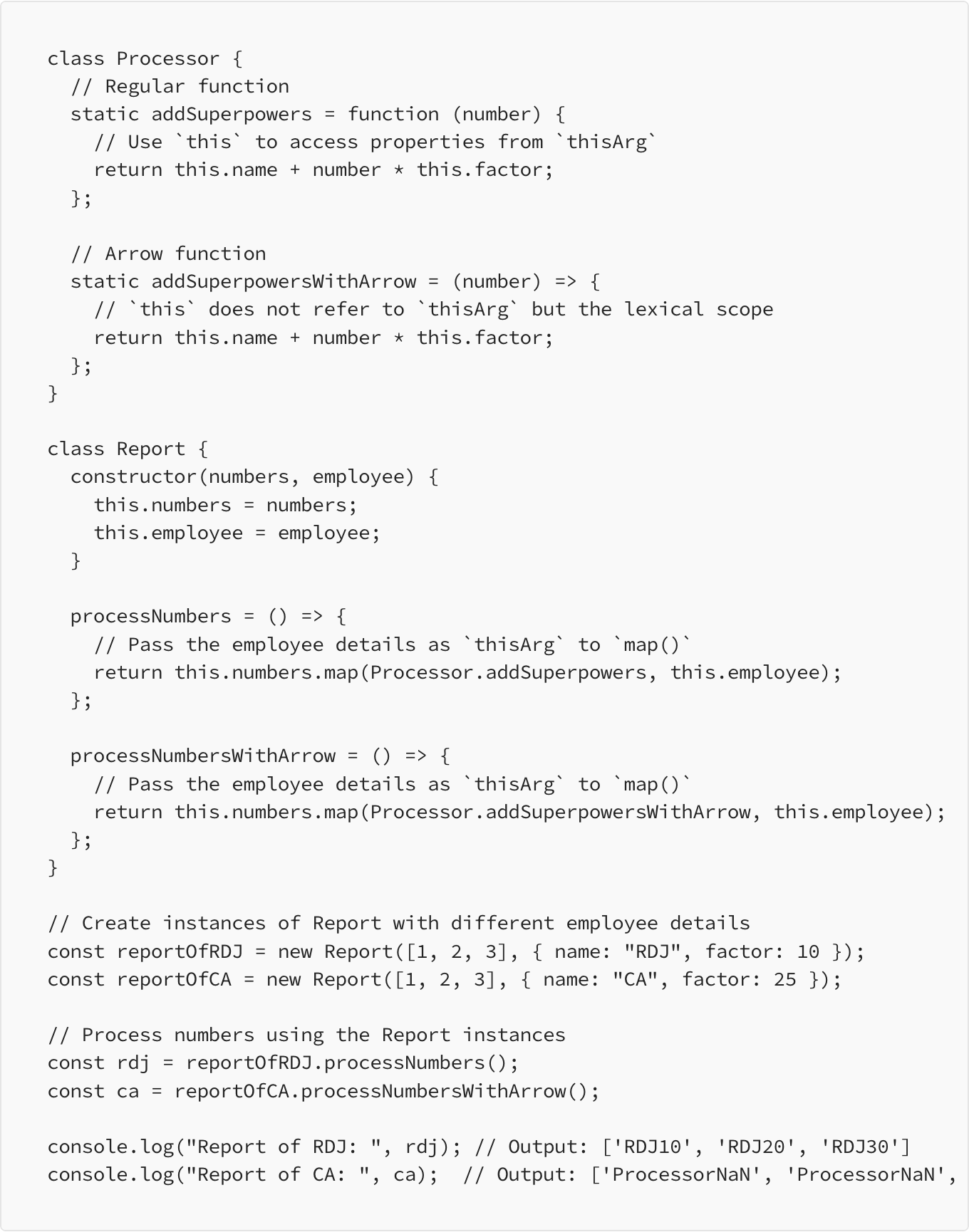
Explanation:
Regular Function (addSuperpowers):
The addSuperpowers() function is defined as a regular function.
When Processor.addSuperpowers is used as a callback function in map(), and this.employee is passed as thisArg, the this context within addSuperpowers refers to the passed employee object.
This means this.name and this.factor correctly access properties from the employee object. As a result, the function successfully calculates and returns the employee’s name concatenated with the product of the number and factor. For instance, with an employee object of { name: “RDJ”, factor: 10 }, the output is [‘RDJ10’, ‘RDJ20’, ‘RDJ30’].
Arrow Function (addSuperpowersWithArrow):
The addSuperpowersWithArrow() function is defined as an arrow function.
Arrow functions do not have their own this context. Instead, this is inherited from the lexical scope where the arrow function was defined.
In this case, this inside addSuperpowersWithArrow refers to the Processor class itself, not the thisArg passed to map(). Since the Processor class does not have explicitly defined local fields named name and factor, this.name and this.factor are undefined within the arrow function. And in JS, by default a scope has a field this.name that stores name of the class in it.
Therefore, the function returns ProcessorNaN for each element, where Processor is the name of the class this.name and NaN represents the undefined value of this.factor multiplied by n.
Summary
Regular Functions: These functions use thisArg to set the correct this context. This allows access to properties or methods from the provided thisArg. In our example, the addSuperpowers function correctly accesses this.name and this.factor from the employee object.
Arrow Functions: Arrow functions do not have their own this context. Instead, they inherit this from their surrounding scope. This means that arrow functions cannot use thisArg to set their context. As demonstrated, the addSuperpowersWithArrow function incorrectly uses this from the Processor class, leading to NaN results due to the absence of the name and factor properties.
So we discussed about simple map usage and different combinations of the arguments their prose and cons. Here is the combined syntax of map() function.
array.map(callback(currentValue[, index[, array]])[, thisArg])
where [] indicates that they are optional arguments.
This is all about map() function in JavaScript, if you have any questions or suggestions, let me know in the comments below. You can also reach out to me on my social media handles:
LinkedIn https://www.linkedin.com/in/ankush-kadam/
Twitter https://x.com/kadamankushb
 Josh Software