


“Flutter is fast… until you try parsing a 50MB JSON on the main thread.” — Ancient Flutter Proverb
Ever tapped a button in your Flutter app and the whole thing just… froze?
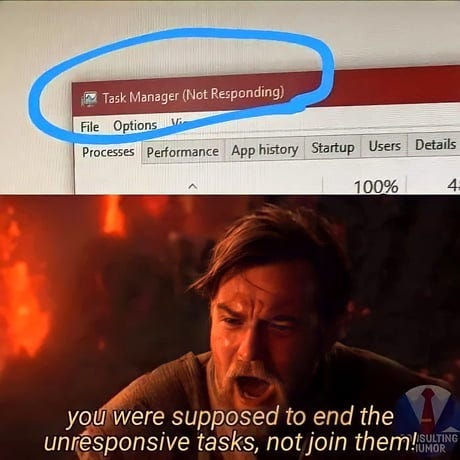
Yeah. That’s what happens when you hand your main UI thread a job meant for a forklift.
Enter: Isolates — Flutter’s way of doing heavy work without nuking your user experience (or your mental health).
What’s an Isolate, Anyway?
Imagine Flutter’s main thread is a delicate artist painting your beautiful UI. Now imagine asking this artist to assemble IKEA furniture, roast coffee beans, and sort emails at the same time.
Bad idea.

Isolates are Dart’s version of “you go do your thing over there.” They run on a separate Dart VM thread with separate memory. No shared memory, no race conditions, no stress.
Reference: Isolates — Dart Docs
When Should You Use Isolates?
- Parsing a large JSON file
- Heavy image processing
- Long computations
- Network-independent CPU-heavy logic
Don’t use Isolates for:
- UI work (they can’t access widgets or BuildContext)
- I/O-bound tasks (like http.get) — just use await!
- Simple async tasks (use Future, async/await)
Sample Scenario: Parsing a HUGE JSON File
Let’s say you’re building a productivity app that tracks everything. Like… everything.
void main() {
  runApp(MyApp());
}

Future<void> loadBigJson() async {
  final jsonStr = await rootBundle.loadString('assets/huge_data.json');
  final data = jsonDecode(jsonStr); // 😬 This might freeze the UI
}
This jsonDecode will freeze your app if the file is huge. Let’s fix that using an Isolate.
Here is a smaller, 5MB and 20MB sample JSONs if you want to have a piece of this snack!
Fixing It With Isolate (The Smart Way)
// other imports
import 'dart:isolate';

void main() {
  runApp(MyApp());
}

Future<void> loadBigJson() async {
  final jsonStr = await rootBundle.loadString('assets/huge_data.json');
  final response = await compute(parseJson, jsonStr);
  print(response);
}

Map<String, dynamic> parseJson(String jsonStr) {
  return jsonDecode(jsonStr);
}
The compute() is Flutter’s sugar-coated way of spinning up a one-time Isolate.
Reference: compute() — Flutter Docs
Advanced: More Control with Isolate.spawn()
void heavyTask(SendPort sendPort) {
 int result = 0;
 for (int i = 0; i < 100000000; i++) {
 result += i;
 }
 sendPort.send(result);
}

void startHeavyTask() async {
 final receivePort = ReceivePort();
 await Isolate.spawn(heavyTask, receivePort.sendPort);

 receivePort.listen((message) {
 print("Got result from isolate: $message");
 });
}
This is how you manage long-running tasks, bi-directional communication, and better control — at the cost of a bit more boilerplate.
Do’s and Don’ts of Isolates
Do
- Use compute() for simple background tasks
- Pass only simple, serializable data (no complex objects)
- Use Isolate.spawn() for long-lived tasks or communication channels
Don’t
- Access UI elements inside Isolates (they don’t know what a BuildContext is)
- Share memory (it’s not possible, anyway — stop trying)
- Overuse compute() (each call spins up a new Isolate, which can be costly)
Debugging Tip: “Why isn’t my Isolate doing anything?!”
- Isolate code must be top-level or static
- You can’t pass closures or non-serializable data
- Check logs for exceptions thrown in the isolate — they don’t bubble up!
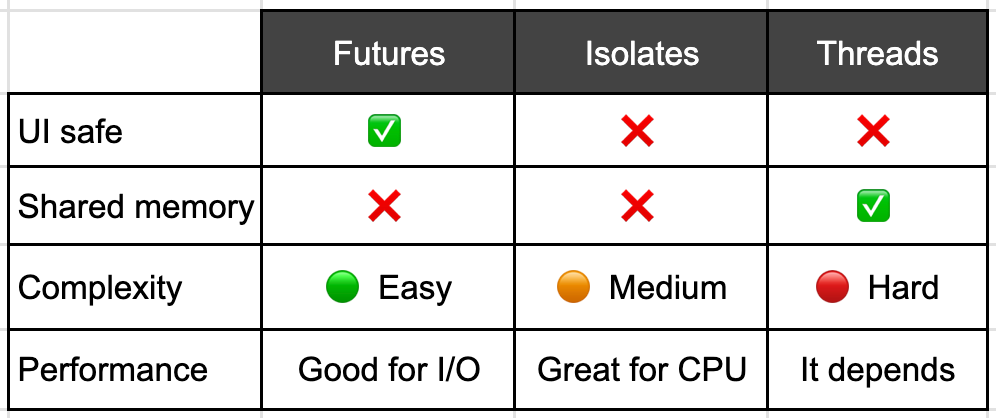
Isolates vs Threads vs Futures — Quick Recap
Final Thought (Let’s Complete the Cycle)

We started with a frozen UI. We’ve now learned how to offload that CPU-heavy lifting to an Isolate — a separate space where heavy work gets done quietly, without bothering our UI artist.
So next time your app needs to move a mountain, remember:
“Don’t give the paintbrush guy a jackhammer. Give it to an Isolate.” — Master Oogway
Because in Flutter, you can stay smooth, fast, responsive — and yes, a little bit cool 😎.
Further Reading
- Dart Concurrency: Isolates and Event Loops
- Flutter: compute() API
- Multithreading with Isolate in Flutter
My other blogs on Flutter
- Code Push for Flutter with Shorebird: A Hotfix Hero’s Tale
- The Not-So-Ingenious Process of iOS App Build, Deployment, and Review: A Flutter Developer’s Perspective
- How to create a simple blackboard in Flutter
 Josh Software