

This is a story about a donate button that slowly turned into a switchboard operator, not because the payments were hard, but because two SDKs refused to speak the same language.

For the longest time, our donate button had exactly one job. A donor picked an amount, tapped Donate, a payment sheet slid up, money moved, we said thank you. One gateway, one happy path, one clean integration. Honest work.
Then the requirement landed: international CSR funders needed to give too. Our existing gateway was perfect for domestic donations but not the right fit for foreign cards. So we added a second gateway, just for those donors. Reasonable, right?
That was the moment our button stopped being a button.
Because the two gateways agreed on absolutely nothing. Razorpay wanted the amount in paise, Stripe wanted it in the currency’s smallest unit. Razorpay popped up a modal and called a handler when it was done. Stripe wanted a client secret up front and handed me back a payment intent. Failures? Razorpay fired an event. Stripe returned an error sitting right there in the response. Different inputs, different success shapes, different id fields. Two SDKs, zero overlap.
So the button coped the only way it knew how: if. If this provider, load this SDK, pass paise, wait for the handler, read razorpay_payment_id. Else if that provider, load the other SDK, pass the minor unit, await the intent, read paymentIntent.id. The button now knew which country you were in, which script to load, and which field held the payment id. That is not a button. That is a switchboard operator.
If you’ve ever watched a clean integration quietly rot into vendor branches the moment a second provider showed up… let’s get rolling…
The Curious Case of the Button That Knew Too Much
Here’s roughly what the checkout had become. I’ve trimmed it, but the shape is real:
async function handleDonate(order: DonationOrder) { if (order.provider === 'razorpay') { const rzp = new window.Razorpay({ key: RAZORPAY_KEY, amount: order.amountInPaise,// paise order_id: order.gatewayOrderId, handler: (res) => { confirmDonation(res.razorpay_payment_id) // one id shape }, }) rzp.on('payment.failed', () => showError()) // failure via event rzp.open() } else if (order.provider === 'stripe') { const stripe = await loadStripe(STRIPE_KEY) const { paymentIntent, error } = await stripe.confirmPayment({ clientSecret: order.clientSecret, // different input entirely confirmParams: { return_url: RETURN_URL }, redirect: 'if_required', }) if (error) return showError() // failure inline confirmDonation(paymentIntent.id) // different id shape }}
Look at what this component is carrying. It knows Razorpay measures money in paise and fails through rzp.on(...). It knows Stripe wants a clientSecret and fails inline. And it knows the payment id hides at razorpay_payment_id for one and paymentIntent.id for the other. The button is fluent in two payment dialects, and it has to translate on the fly, every single tap.
The dependency looked like this:
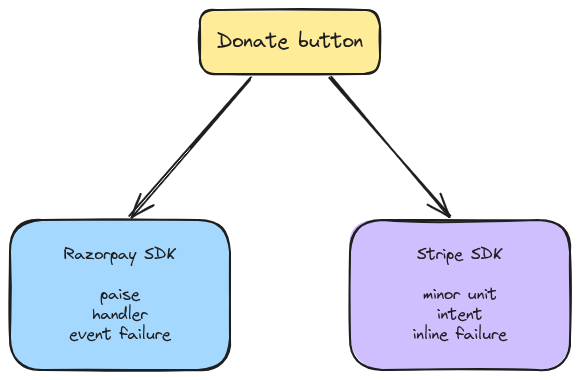
And here’s the part that actually hurt. Every new requirement reached straight back into this one function. A third gateway for a region we were expanding into? Another else if. A retry flow? Duplicated twice, slightly differently. A teammate touching the Stripe branch accidentally broke the Razorpay one, because they were living in the same room, sharing the same walls.

The pattern that fixes this has a name: Adapter.
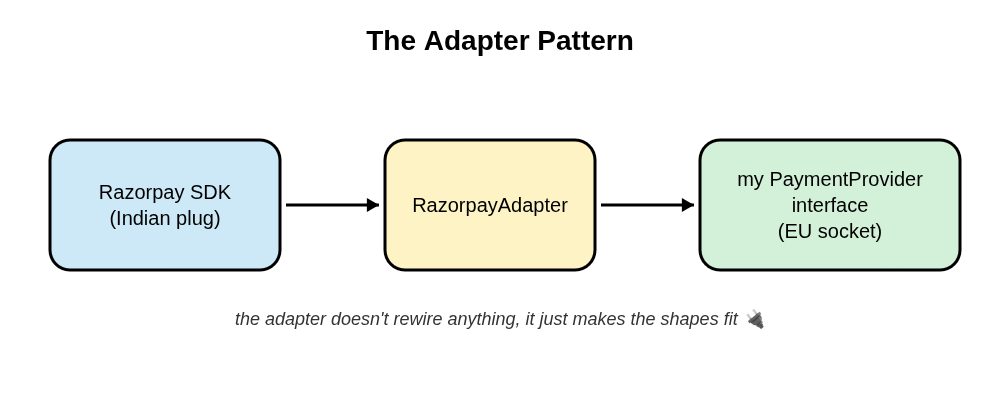
Picture travelling from India to Europe with your phone charger. Your plug has the wrong pins for the wall. You don’t rewire the hotel. You don’t rebuild your charger. You buy a cheap little adapter, slip it between the two, and the shapes line up. The adapter adds no features. It doesn’t make electricity simpler. It just makes an incompatible thing fit a socket you can’t change.
That’s Adapter: you wrap an existing, incompatible interface so it fits the one your code already expects.
Now the distinction that’ll save you in the comments.
Strategy is when you own all the implementations and you write them to your interface, then pick one at runtime. That was my switch-statement-gets-its-own-apartment post: every strategy was my own code, built to fit. Adapter is when you don’t own the thing behind the interface. I can’t make Stripe implement my interface. I can’t make Razorpay hand back the same shape as Stripe. They’re third parties with their own incompatible SDKs, so I wrap each one, and the wrapper is the adapter.
The Solution
First, decide the one interface the app actually wants. Not Razorpay’s shape, not Stripe’s, mine:
interface PaymentResult { status: 'success' | 'failed' | 'cancelled' providerRef: string // whatever the gateway calls its payment id amountInPaise: number // we standardize on ONE money unit internally}interface PaymentProvider { initiatePayment(order: DonationOrder): Promise<PaymentResult>}
One method. A normalized result. The app now speaks one money unit and one id field, forever. That’s the socket every gateway has to fit.
Then, one adapter per SDK. Each one absorbs a single gateway’s quirks and hands back the shape above.
Razorpay:
// wraps Razorpay's callback + event API into a clean promiseclass RazorpayAdapter implements PaymentProvider { initiatePayment(order: DonationOrder): Promise<PaymentResult> { return new Promise((resolve) => { const rzp = new window.Razorpay({ key: RAZORPAY_KEY, amount: order.amountInPaise, // Razorpay speaks paise, which we already do order_id: order.gatewayOrderId, handler: (res) => resolve({ status: 'success', providerRef: res.razorpay_payment_id, // translate the id field amountInPaise: order.amountInPaise, }), }) rzp.on('payment.failed', () => resolve({ status: 'failed', providerRef: '', amountInPaise: order.amountInPaise }), ) rzp.open() }) }}
Stripe:
// wraps Stripe's intent-based API into the same clean promiseclass StripeAdapter implements PaymentProvider { async initiatePayment(order: DonationOrder): Promise<PaymentResult> { const stripe = await loadStripe(STRIPE_KEY) const { paymentIntent, error } = await stripe.confirmPayment({ clientSecret: order.clientSecret, confirmParams: { return_url: RETURN_URL }, redirect: 'if_required', }) if (error || !paymentIntent) { return { status: 'failed', providerRef: '', amountInPaise: order.amountInPaise } } return { status: paymentIntent.status === 'succeeded' ? 'success' : 'failed', providerRef: paymentIntent.id, // translate the id field amountInPaise: order.amountInPaise, } }}
One tiny factory picks the adapter. Yes, that’s a switch, and yes, that’s fine. It’s one switch, in one place, and it’s the only code in the whole app that knows more than one gateway exists:
function getPaymentProvider(name: ProviderName): PaymentProvider { switch (name) { case 'razorpay': return new RazorpayAdapter() case 'stripe': return new StripeAdapter() }}
And now the donate button. Read how little it knows:
const provider = getPaymentProvider(order.provider)const result = await provider.initiate(order)if (result.status === PAYMENT_CONSTANTS.SUCCESS) { confirmDonation(result.providerRef)}
What Just Happened:
- The button talks to one interface,
PaymentProvider. It can’t tell Razorpay from Stripe, and it doesn’t want to. - Each adapter swallows one SDK’s quirks: callback versus promise, event failure versus inline failure,
razorpay_payment_idversuspaymentIntent.id. - Money is normalized at the boundary, so the app has exactly one money truth (paise), everywhere.
- Adding a third gateway is a new file,
PayPalAdapter, plus one line in the factory. The button never changes.
The mess didn’t vanish. It moved into the adapters, where it belongs, one gateway per file, walls between them.
Quick Checks & Tips
A few things I’d tell past-me before wrapping the first SDK:
- Normalize at the boundary, not in the UI. Money units especially. Convert paise, cents, or minor units inside the adapter so nothing downstream ever second-guesses what a number means.
- Keep the target interface small.
initiate, maybeverify. The second you add arazorpayOptionsfield to the shared interface, the abstraction has leaked and you’re back to branching. - One adapter, one SDK. Don’t build a mega-adapter with an internal switch. That’s the
else ifyou just deleted, wearing a disguise. 😬 - Adapters are a gift to tests. Mock
PaymentProviderand your checkout logic tests cleanly, without loading a single real SDK or opening a real payment sheet. - Trust the server, not the client. A client-side
handlerfiring “success” isn’t proof money moved. The adapter can resolve optimistically for the UI, but the real confirmation is your server webhook. Keep that truth on the backend.
Where Else Can We Apply This?
- Auth providers. Auth0, Supabase, a legacy custom JWT service, each wrapped to one
AuthProviderinterface so the app never learns their differences. - File uploads. S3, Cloudinary, Firebase Storage behind a single
uploadFile(file): Promise<UploadedAsset>. - Maps. Google Maps, Mapbox, and Leaflet all speak different dialects, so one map adapter lets the rest of the app stay neutral.
- Library migrations. Moving from Moment to date-fns? Put a thin adapter in front of your date calls, migrate the adapter’s insides, and never touch the call sites.
- Analytics. Segment, Mixpanel, GA behind one
track(event). (Fair warning: this one edges toward Strategy if the backends are interchangeable by design, so mind the line I drew above.)
End Game
You don’t wake up one day and say: “Today I’ll implement the Adapter Pattern.” It happens naturally when a second vendor shows up and refuses to speak your app’s language.
The triggers I’ve noticed:
- A second third-party provider for something you already had exactly one of.
- An SDK whose shape is leaking into your components, paise here, cents there, a stray
razorpay_field sitting in your UI code. - A migration where you can’t realistically change every call site at once.
When any of those show up, you don’t need to rewrite your app around a vendor. You need a small translator at the border, so the rest of your code gets to stay monolingual. That’s all an adapter is. A little plug that makes an incompatible thing fit a socket you refuse to rebuild.
If you’ve wrapped a stubborn third-party SDK to fit an interface you already had, I’d love to hear how you solved it in the comments. Cheers!!

